By using this site, you agree to the Privacy Policy and Terms of Use.
Accept

GadgetBond

  • Latest
  • How-to
  • Tech
    • AI
    • Amazon
    • Apple
    • CES
    • Computing
    • Creators
    • Google
    • Meta
    • Microsoft
    • Mobile
    • Samsung
    • Security
    • Xbox
  • Transportation
    • Audi
    • BMW
    • Cadillac
    • E-Bike
    • Ferrari
    • Ford
    • Honda Prelude
    • Lamborghini
    • McLaren W1
    • Mercedes
    • Porsche
    • Rivian
    • Tesla
  • Culture
    • Apple TV
    • Disney
    • Gaming
    • Hulu
    • Marvel
    • HBO Max
    • Netflix
    • Paramount
    • SHOWTIME
    • Star Wars
    • Streaming
Add GadgetBond as a preferred source to see more of our stories on Google.
Font ResizerAa
GadgetBondGadgetBond
  • Latest
  • Tech
  • AI
  • Deals
  • How-to
  • Apps
  • Mobile
  • Gaming
  • Streaming
  • Transportation
Search
  • Latest
  • Deals
  • How-to
  • Tech
    • Amazon
    • Apple
    • CES
    • Computing
    • Creators
    • Google
    • Meta
    • Microsoft
    • Mobile
    • Samsung
    • Security
    • Xbox
  • AI
    • Anthropic
    • ChatGPT
    • ChatGPT Atlas
    • Gemini AI (formerly Bard)
    • Google DeepMind
    • Grok AI
    • Meta AI
    • Microsoft Copilot
    • OpenAI
    • Perplexity
    • xAI
  • Transportation
    • Audi
    • BMW
    • Cadillac
    • E-Bike
    • Ferrari
    • Ford
    • Honda Prelude
    • Lamborghini
    • McLaren W1
    • Mercedes
    • Porsche
    • Rivian
    • Tesla
  • Culture
    • Apple TV
    • Disney
    • Gaming
    • Hulu
    • Marvel
    • HBO Max
    • Netflix
    • Paramount
    • SHOWTIME
    • Star Wars
    • Streaming
Follow US
AppleComputingiPadiPadOSMac

Apple’s iPadOS 18 fails to impress professional users with the M4 iPad Pro

Is the iPad Pro still just a tablet? The M4 iPad Pro deserves more.

By
Shubham Sawarkar
Shubham Sawarkar's avatar
ByShubham Sawarkar
Editor-in-Chief
I’m a tech enthusiast who loves exploring gadgets, trends, and innovations. With certifications in CISCO Routing & Switching and Windows Server Administration, I bring a sharp...
Follow:
- Editor-in-Chief
Jun 12, 2024, 9:13 AM EDT
Share
We may get a commission from retail offers. Learn more
2024 Apple iPad Pro
Image: Apple
SHARE

Apple‘s annual developer conference, WWDC, is usually a time for excitement, especially when it comes to the iPad Pro. This year, however, the focus on iPadOS 18 left many professional users feeling like they’d been dealt a losing hand.

The M4 chip, unveiled in May 2024, promised a powerhouse performance upgrade for the 2024 iPad Pro with its stunning new OLED display. But instead of software that could truly harness this potential, Apple delivered a feature set that felt underwhelming at best.

2024 OLED iPad Pro with M4 chip features overview
Image: Apple

The biggest “innovation” for iPad users this year? A standalone Calculator app. Yes, you read that right. After 14 years, Apple finally decided to grace the iPad with a blown-up version of the existing iPhone calculator. Now, it’s not a bad calculator, but it’s hardly the kind of groundbreaking feature professional users were expecting.

A close-up image of a tablet computer screen displaying a calculator app. The calculator app has a standard layout with numbers, mathematical operators, and function keys. The display shows a calculation in progress, with the number "3.12839927" on the display. There is also an edit button, a history tape, and several other buttons specific to the iPad calculator app, such as mc, mr, m+, and m-.
Apple iPad Calculator app
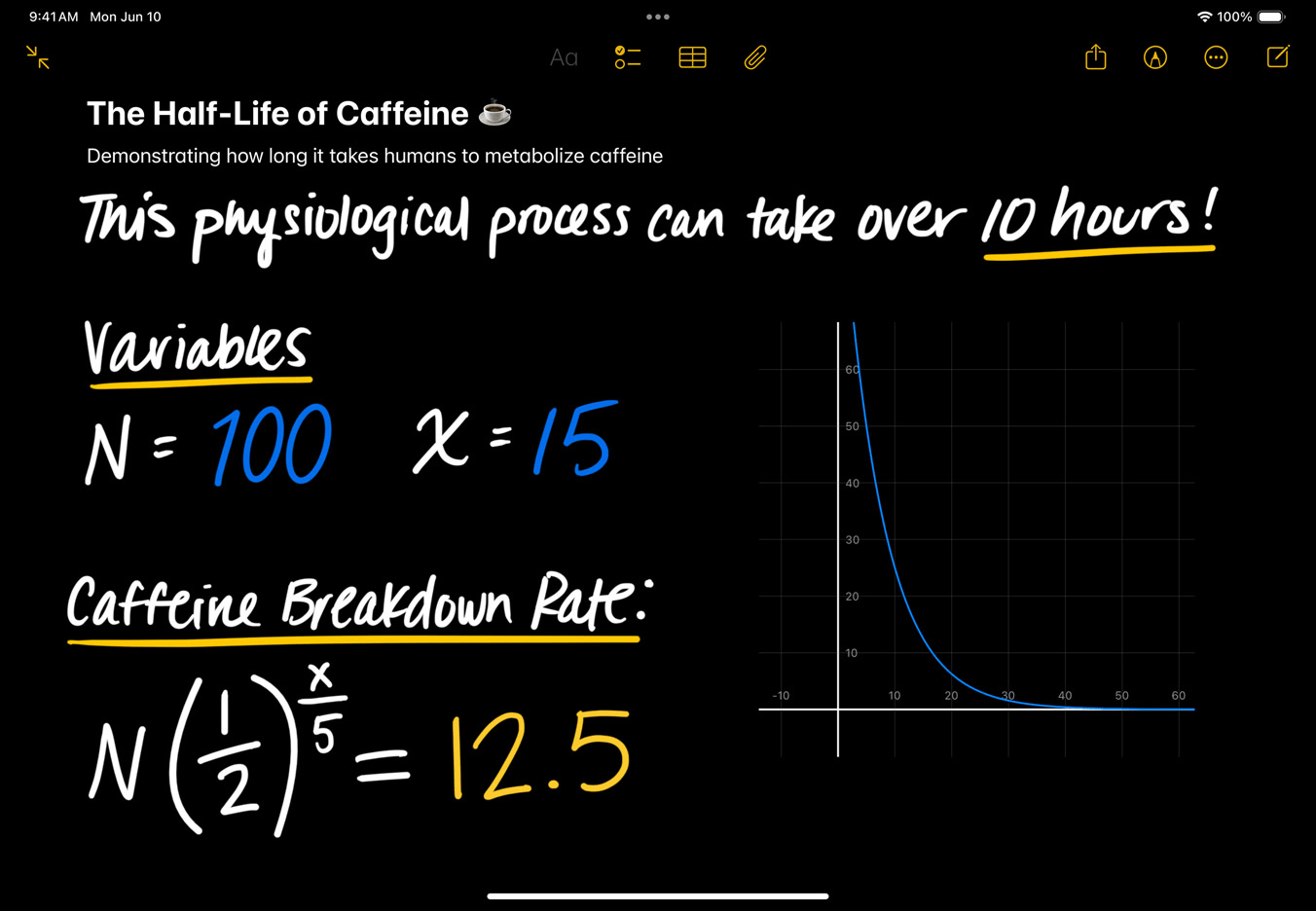
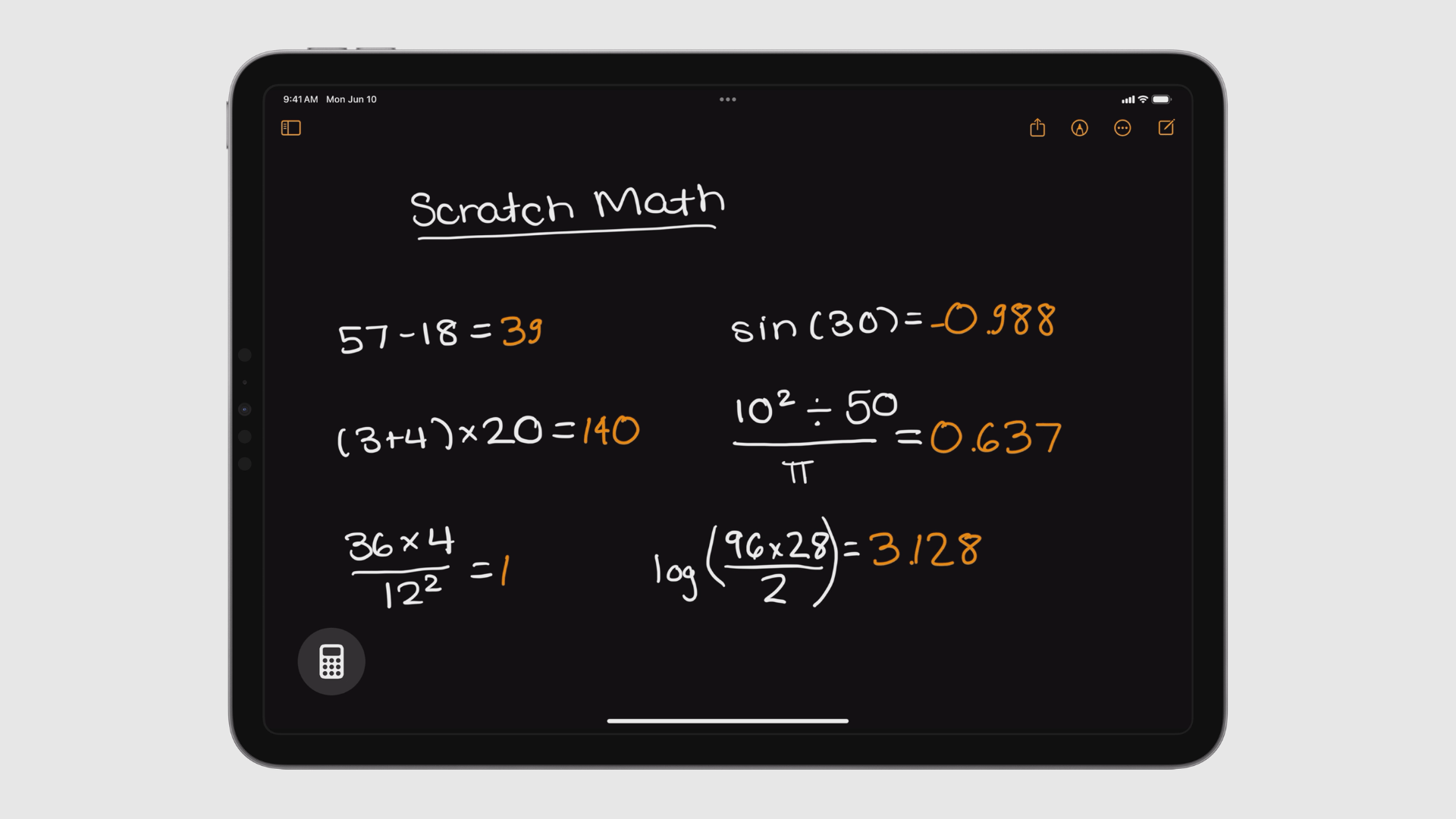
Math equations written with Apple Pencil, being solved instantly in Notes.

There were a couple of other minor additions that seemed more like afterthoughts than genuine advancements. One borrows functionality from a popular third-party app, allowing users to perform basic calculations within the Notes app with plain English commands. Another introduces a new interface for using the Apple Pencil to write out dynamic calculations, similar to Microsoft Math Solver.

These features, while potentially useful, do little to address the core issue: iPadOS 18 still treats the iPad Pro primarily as a secondary device for professional tasks. There’s no sign of features that would allow it to compete more directly with a laptop.

Some might argue that the iPad Pro doesn’t need to run macOS. Perhaps, in the future, Apple’s devices will work more seamlessly together, with iPad mirroring Mac, Apple TV mirroring iPad, and so on. But that’s not the reality today.

So, what were professional users hoping for? Here’s a shortlist:

  • Pro apps: The absence of essential pro applications like Xcode, Preview, and TextEdit is a glaring omission.
  • Multitasking enhancements: There’s still a lack of flexibility when it comes to installing apps, running background utilities, and managing background processes during demanding tasks like video editing.
  • Window management: Stage Manager, introduced last year, feels unfinished and unpolished.
  • User accounts: Unlike Macs, iPads lack the ability to create separate user accounts, limiting their usefulness in shared environments.

The overall impression from WWDC was one of missed opportunities. While some of the iPadOS 18 features might trickle down to iPhones and be generally useful, there’s little here that feels specifically designed to tap into the power of the M4 iPad Pro. Here’s hoping next year brings a more substantial update for professional iPad users.

Related /

  • Apple iPadOS 18: everything you need to know
  • The iPad gets a calculator app (finally!)
  • Apple Passwords app keeps your logins secure and easily accessible across all your devices
  • What is Apple Intelligence

Discover more from GadgetBond

Subscribe to get the latest posts sent to your email.

Topic:Apple M4 chipApple siliconiPad ProTablet
Most Popular

DJI’s FC200 and T200 drones push industrial delivery and agriculture into the 200kg era

DJI Osmo Mobile 8P debuts with detachable remote and smarter tracking

ChatGPT for Clinicians is now free for verified US doctors

OpenAI Privacy Filter brings open-weight PII redaction to everyone

Opera GX Playground bundles panic button, Fake My History and Grass Touching Corner

Also Read
Outdoor close-up of an Amazon Project Kuiper low Earth orbit satellite internet terminal mounted on a stand overlooking a golf course. The flat rectangular antenna dish is positioned against a background of green fairways, tall trees, and a clear blue sky, representing Amazon’s Leo satellite internet connectivity for the DP World Tour.

DP World Tour adds Amazon Leo for live event connectivity

Dramatic promotional artwork of a hooded pirate assassin from Assassin’s Creed Black Flag Resynced holding a curved sword and an ornate flintlock pistol. Flames surround him in a circular blaze, with a burning pirate flag featuring a skull emblem in the background. The dark, fiery setting highlights the intense pirate combat and action-adventure theme of the game.

Assassin’s Creed Black Flag Resynced preorders are now live

Promotional artwork for Assassin’s Creed Black Flag Resynced showing a hooded pirate assassin standing on a ship deck with a curved sword in one hand and a flintlock pistol in the other. Pirate crew members, ship rigging, and a large sailing ship appear in the background under a bright blue sky. The title “Assassin’s Creed Black Flag Resynced” is displayed prominently at the top, emphasizing the action-adventure pirate setting.

Ubisoft announces Assassin’s Creed Black Flag Resynced for July 9

Screenshot of Microsoft PowerPoint with the Copilot side panel open beside a presentation titled “Monthly Operations Report.” The Copilot panel shows “Allow editing” selected, letting Copilot directly edit the presentation, with an alternative “Chat only” mode available. Suggested actions include creating a presentation, adding a slide, or creating a branded presentation, demonstrating AI-assisted presentation editing.

Microsoft adds agentic Copilot to Word, Excel, and PowerPoint

Windows 11 logo with white Windows icon and ‘Windows 11’ text on a solid blue background.

Windows Insider starts moving users to Experimental and Beta

Password Illustration

Microsoft finally adds passkey sync to its built-in password manager

Perplexity illustration. Abstract illustration of a transparent glass cube refracting beams of light into rainbow-like streaks across a dark, textured surface, symbolizing clarity, synthesis, and the convergence of multiple perspectives.

GPT-5.5 is now on Perplexity – but only for Max subscribers

Stylish living room featuring the Amazon Ember Artline lifestyle TV mounted above a white marble fireplace. The TV displays a framed landscape artwork of rolling green hills with orange flowers under a blue sky, blending in like wall art. The room includes a mustard yellow sofa with decorative pillows, wooden lounge chairs, warm wall sconces, books, and modern decor, creating a cozy upscale interior design.

Amazon Ember Artline is now available in the US, starting at $899

Company Info
  • Homepage
  • Support my work
  • Latest stories
  • Company updates
  • GDB Recommends
  • Daily newsletters
  • About us
  • Contact us
  • Write for us
  • Editorial guidelines
Legal
  • Privacy Policy
  • Cookies Policy
  • Terms & Conditions
  • DMCA
  • Disclaimer
  • Accessibility Policy
  • Security Policy
  • Do Not Sell or Share My Personal Information
Socials
Follow US

Disclosure: We love the products we feature and hope you’ll love them too. If you purchase through a link on our site, we may receive compensation at no additional cost to you. Read our ethics statement. Please note that pricing and availability are subject to change.

Copyright © 2026 GadgetBond. All Rights Reserved. Use of this site constitutes acceptance of our Terms of Use and Privacy Policy | Do Not Sell/Share My Personal Information.