By using this site, you agree to the Privacy Policy and Terms of Use.
Accept

GadgetBond

  • Latest
  • How-to
  • Tech
    • AI
    • Amazon
    • Apple
    • CES
    • Computing
    • Creators
    • Google
    • Meta
    • Microsoft
    • Mobile
    • Samsung
    • Security
    • Xbox
  • Transportation
    • Audi
    • BMW
    • Cadillac
    • E-Bike
    • Ferrari
    • Ford
    • Honda Prelude
    • Lamborghini
    • McLaren W1
    • Mercedes
    • Porsche
    • Rivian
    • Tesla
  • Culture
    • Apple TV
    • Disney
    • Gaming
    • Hulu
    • Marvel
    • HBO Max
    • Netflix
    • Paramount
    • SHOWTIME
    • Star Wars
    • Streaming
Best Deals
Font ResizerAa
GadgetBondGadgetBond
  • Latest
  • Tech
  • AI
  • Deals
  • How-to
  • Apps
  • Mobile
  • Gaming
  • Streaming
  • Transportation
Search
  • Latest
  • Deals
  • How-to
  • Tech
    • Amazon
    • Apple
    • CES
    • Computing
    • Creators
    • Google
    • Meta
    • Microsoft
    • Mobile
    • Samsung
    • Security
    • Xbox
  • AI
    • Anthropic
    • ChatGPT
    • ChatGPT Atlas
    • Gemini AI (formerly Bard)
    • Google DeepMind
    • Grok AI
    • Meta AI
    • Microsoft Copilot
    • OpenAI
    • Perplexity
    • xAI
  • Transportation
    • Audi
    • BMW
    • Cadillac
    • E-Bike
    • Ferrari
    • Ford
    • Honda Prelude
    • Lamborghini
    • McLaren W1
    • Mercedes
    • Porsche
    • Rivian
    • Tesla
  • Culture
    • Apple TV
    • Disney
    • Gaming
    • Hulu
    • Marvel
    • HBO Max
    • Netflix
    • Paramount
    • SHOWTIME
    • Star Wars
    • Streaming
Follow US
AppleiOSiPhone

What’s new in iOS 15.1 update

By
Shubham Sawarkar
Shubham Sawarkar
ByShubham Sawarkar
Editor-in-Chief
I’m a tech enthusiast who loves exploring gadgets, trends, and innovations. With certifications in CISCO Routing & Switching and Windows Server Administration, I bring a sharp...
Follow:
- Editor-in-Chief
Oct 26, 2021, 11:35 PM EDT
Share
We may get a commission from retail offers. Learn more
What’s new in iOS 15.1 update
SHARE

Apple released the iOS 15.1 OTA update to eligible iPhones on Monday, October 25th. iOS 15.1 brought SharePlay, ProRes support for the new iPhone 13 Pro series, and COVID-19 vaccination cards in Apple Wallet, among other improvements. Check out our full changelog and feature updates below.

SharePlay support

iOS 15.1 adds support for SharePlay, which allows users to share their FaceTime experience with family and friends using content from the Apple TV app, Apple Music, Apple Fitness+, and certain of the App Store’s compatible apps. SharePlay allows everyone to control the power to pause, play, rewind, and fast forward as well as the coolest way to adjust the level of TV shows or music when someone talks to you.

SharePlay also allows users to share Apple TV content on a larger screen while on FaceTime calls, allowing them to continue FaceTime calls while watching shows or movies without interruption. And Apple added another feature for users: on FaceTime calls, everyone may share their screen to show them what you’re looking at, such as seeing photos from a photo app, browsing the web, or even watching shows or movies together.

SharePlay is supported by built-in apps such as Apple TV, Apple Music, Apple Fitness+, and many more. Apple also allows third-party developers to incorporate the SharePlay feature into their apps, games, or even services.

ProRes support

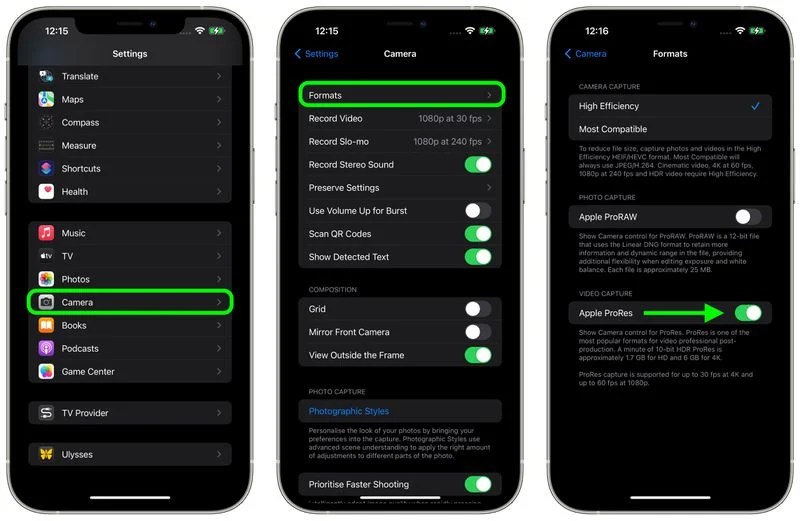
The new feature is also available in the Camera app for the iPhone 13 Pro and iPhone 13 Pro Max, thanks to the iOS 15.1 update. This update includes support for Apple ProRes in the iPhone 13 Pro and 13 Pro Max, as well as the ability to enable/disable ProRes in the Camera app in Settings.

ProRes is a professional video recording format used by creators of TV shows, commercials, and films, and it provides improved color accuracy and less compression. Owners of the iPhone 13 Pro and Pro Max with ProRes support may capture, edit, and share professional-quality videos from their devices.
What’s new in iOS 15.1 update
Courtesy of MacRumors

Others

Users can now add COVID-19 vaccination cards to the Wallet app, allowing them to access their vaccination cards at any time and from any location. When taking macro images and movies on the iPhone 13 Pro or iPhone 13 Pro Max, Apple has also included the option to disable automatic camera switching.

What’s new in iOS 15.1 update
Courtesy of MacRumors

Mandarine Chinese (Taiwan) is now supported in the Apple Translate app as well as system-wide translation. New automation triggers based on a HomeKit sensor’s current reading enable humidity, air quality, or light level sensors. In terms of Shortcuts, the new pre-built actions allow users to overlay text on photographs, gifs, and a new collection of games that you can play with Siri.

Still not updated your iPhone with the latest iOS version? Well it is the best time to update now, go to the Settings > General > Software Update, and check for any iOS update available or enable Automatic Updates for the best iOS update experience when you are not working on your iPhone, I mean Apple will try to install updates overnight after its been downloaded. If the iOS update came with a small size update you can update your iPhone over the cellular networks or if the iOS update got bigger then Apple will recommend you to connect your iPhone to the Wi-Fi network.


Discover more from GadgetBond

Subscribe to get the latest posts sent to your email.

Topic:iOSiPhone
Leave a Comment

Leave a ReplyCancel reply

Most Popular

The creative industry’s biggest anti-AI push is officially here

This rugged Android phone boots Linux and Windows 11

The fight over Warner Bros. is now a shareholder revolt

Sony returns to vinyl with two new Bluetooth turntables

Bungie confirms March 5 release date for Marathon shooter

Also Read
The Apple logo, a white silhouette of an apple with a bite taken out of it, is displayed in the center of a circular, colorful pattern. The pattern consists of small, multicolored dots arranged in a radial pattern around the apple. The background is black.

Apple reportedly plans an AI pin you can wear

Gurman: Apple to simplify the “Hey Siri” trigger phrase to just “Siri”

Apple’s Siri reboot is all about conversational AI

An image of an iPhone mockup for MacPaw's Setapp Mobile, an alternative iOS app store for EU users. The first mockup shows multiple app listings, the second shows a preview of the app, and the last one shows an app activation popup.

Setapp Mobile is shutting down on iOS this February

A black-background grid showing Apple Creator Studio apps, including colorful icons for Final Cut Pro, Logic Pro, Pixelmator Pro, Keynote, Pages, Numbers, Freeform, Motion, Compressor, and MainStage, each labeled beneath its rounded-square icon.

Apple Creator Studio is built to lure Adobe users

Apple iPhone 7 showing its screen with Siri app.

Siri’s biggest upgrade yet is powered by Google’s Gemini AI

White Apple Card photo.

The Apple Card looks the same, but the bank behind it is changing completely

A hand holds iPhone 17 green phone, showing Apple logo, dual camera, anti-theft cable in electronics store

Apple breaks tradition with no regular iPhone 18 in 2026

A person wearing Apple Vision Pro on a train.

Apple cuts Vision Pro production after poor sales

Company Info
  • Homepage
  • Support my work
  • Latest stories
  • Company updates
  • GDB Recommends
  • Daily newsletters
  • About us
  • Contact us
  • Write for us
  • Editorial guidelines
Legal
  • Privacy Policy
  • Cookies Policy
  • Terms & Conditions
  • DMCA
  • Disclaimer
  • Accessibility Policy
  • Security Policy
  • Do Not Sell or Share My Personal Information
Socials
Follow US

Disclosure: We love the products we feature and hope you’ll love them too. If you purchase through a link on our site, we may receive compensation at no additional cost to you. Read our ethics statement. Please note that pricing and availability are subject to change.

Copyright © 2025 GadgetBond. All Rights Reserved. Use of this site constitutes acceptance of our Terms of Use and Privacy Policy | Do Not Sell/Share My Personal Information.