By using this site, you agree to the Privacy Policy and Terms of Use.
Accept

GadgetBond

  • Latest
  • How-to
  • Tech
    • AI
    • Amazon
    • Apple
    • CES
    • Computing
    • Creators
    • Google
    • Meta
    • Microsoft
    • Mobile
    • Samsung
    • Security
    • Xbox
  • Transportation
    • Audi
    • BMW
    • Cadillac
    • E-Bike
    • Ferrari
    • Ford
    • Honda Prelude
    • Lamborghini
    • McLaren W1
    • Mercedes
    • Porsche
    • Rivian
    • Tesla
  • Culture
    • Apple TV
    • Disney
    • Gaming
    • Hulu
    • Marvel
    • HBO Max
    • Netflix
    • Paramount
    • SHOWTIME
    • Star Wars
    • Streaming
Add GadgetBond as a preferred source to see more of our stories on Google.
Font ResizerAa
GadgetBondGadgetBond
  • Latest
  • Tech
  • AI
  • Deals
  • How-to
  • Apps
  • Mobile
  • Gaming
  • Streaming
  • Transportation
Search
  • Latest
  • Deals
  • How-to
  • Tech
    • Amazon
    • Apple
    • CES
    • Computing
    • Creators
    • Google
    • Meta
    • Microsoft
    • Mobile
    • Samsung
    • Security
    • Xbox
  • AI
    • Anthropic
    • ChatGPT
    • ChatGPT Atlas
    • Gemini AI (formerly Bard)
    • Google DeepMind
    • Grok AI
    • Meta AI
    • Microsoft Copilot
    • OpenAI
    • Perplexity
    • xAI
  • Transportation
    • Audi
    • BMW
    • Cadillac
    • E-Bike
    • Ferrari
    • Ford
    • Honda Prelude
    • Lamborghini
    • McLaren W1
    • Mercedes
    • Porsche
    • Rivian
    • Tesla
  • Culture
    • Apple TV
    • Disney
    • Gaming
    • Hulu
    • Marvel
    • HBO Max
    • Netflix
    • Paramount
    • SHOWTIME
    • Star Wars
    • Streaming
Follow US
AppleApple EventAppsiPadiPadOS

The iPad gets a calculator app (finally!)

iPadOS 18 brings a native Calculator app with a twist: solve math problems by hand using Apple Pencil (Math Notes).

By
Shubham Sawarkar
Shubham Sawarkar's avatar
ByShubham Sawarkar
Editor-in-Chief
I’m a tech enthusiast who loves exploring gadgets, trends, and innovations. With certifications in CISCO Routing & Switching and Windows Server Administration, I bring a sharp...
Follow:
- Editor-in-Chief
Jun 10, 2024, 2:35 PM EDT
Share
We may get a commission from retail offers. Learn more
A close-up image of a tablet computer screen displaying a calculator app. The calculator app has a standard layout with numbers, mathematical operators, and function keys. The display shows a calculation in progress, with the number "3.12839927" on the display. There is also an edit button, a history tape, and several other buttons specific to the iPad calculator app, such as mc, mr, m+, and m-.
Image: Apple
SHARE

For iPad users, it’s a tale as old as time (well, 14 years to be exact). The ubiquitous Calculator app, a staple on iPhones since the dawn of iOS, has been strangely absent from the iPad. But fret no more, iPad enthusiasts, because Apple has finally unveiled a native Calculator app for its tablets at WWDC 2024.

This might seem like a basic feature, something most users wouldn’t even bat an eyelid at. But for iPad users, the lack of a Calculator app has been a persistent source of minor frustration. After all, the iPad is a powerful device, capable of handling a multitude of tasks, from creative pursuits to productivity workflows. Yet, for some quick calculations, users had to resort to workarounds – using the web browser, downloading third-party apps, or even resorting to pen and paper.

The wait is finally over. The iPadOS 18 update brings a Calculator app that looks familiar to iPhone users. It boasts the same clean interface and functionality, allowing for basic and scientific calculations. But the iPad version takes advantage of the device’s larger screen real estate, offering a more comfortable user experience.

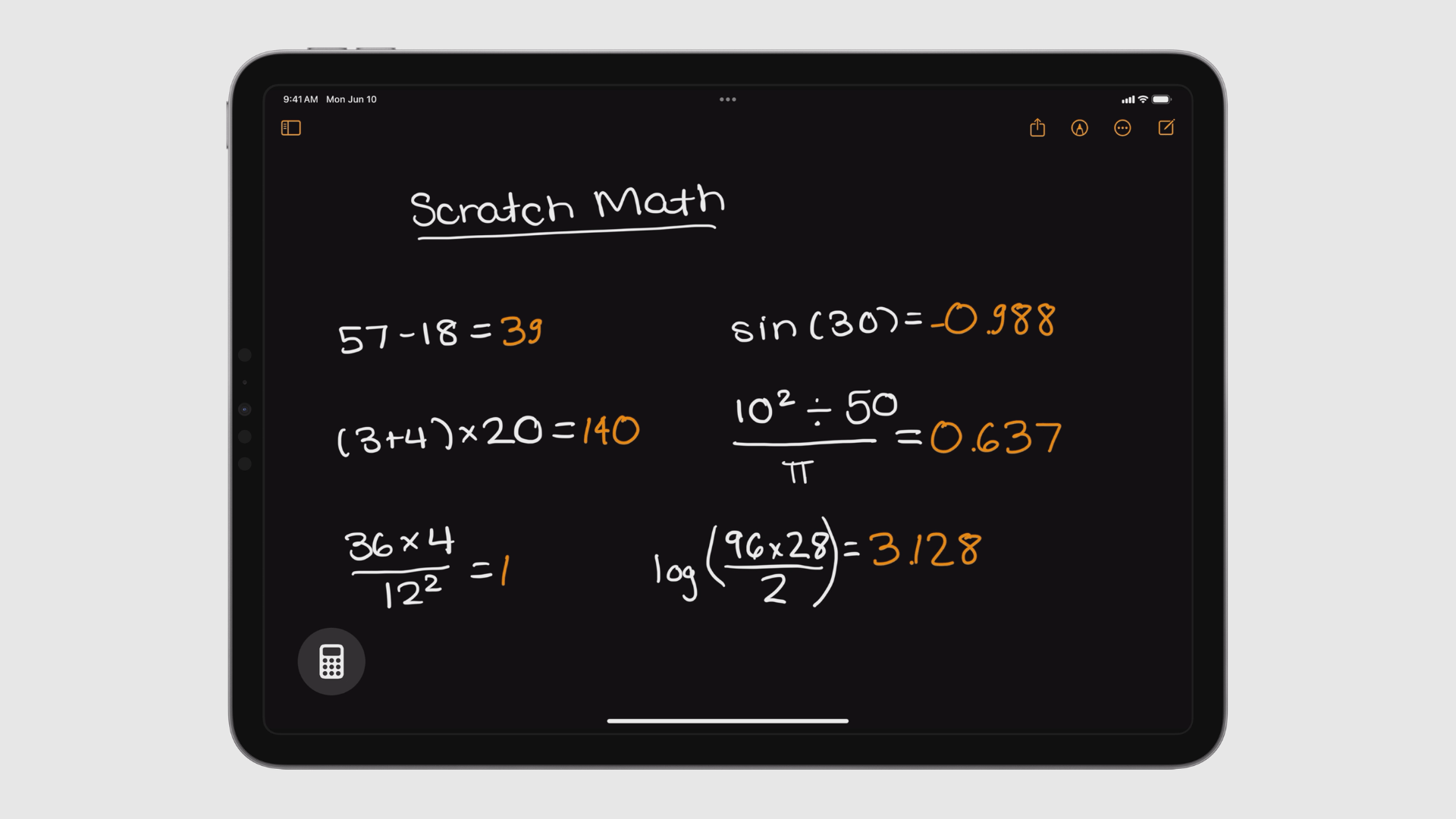
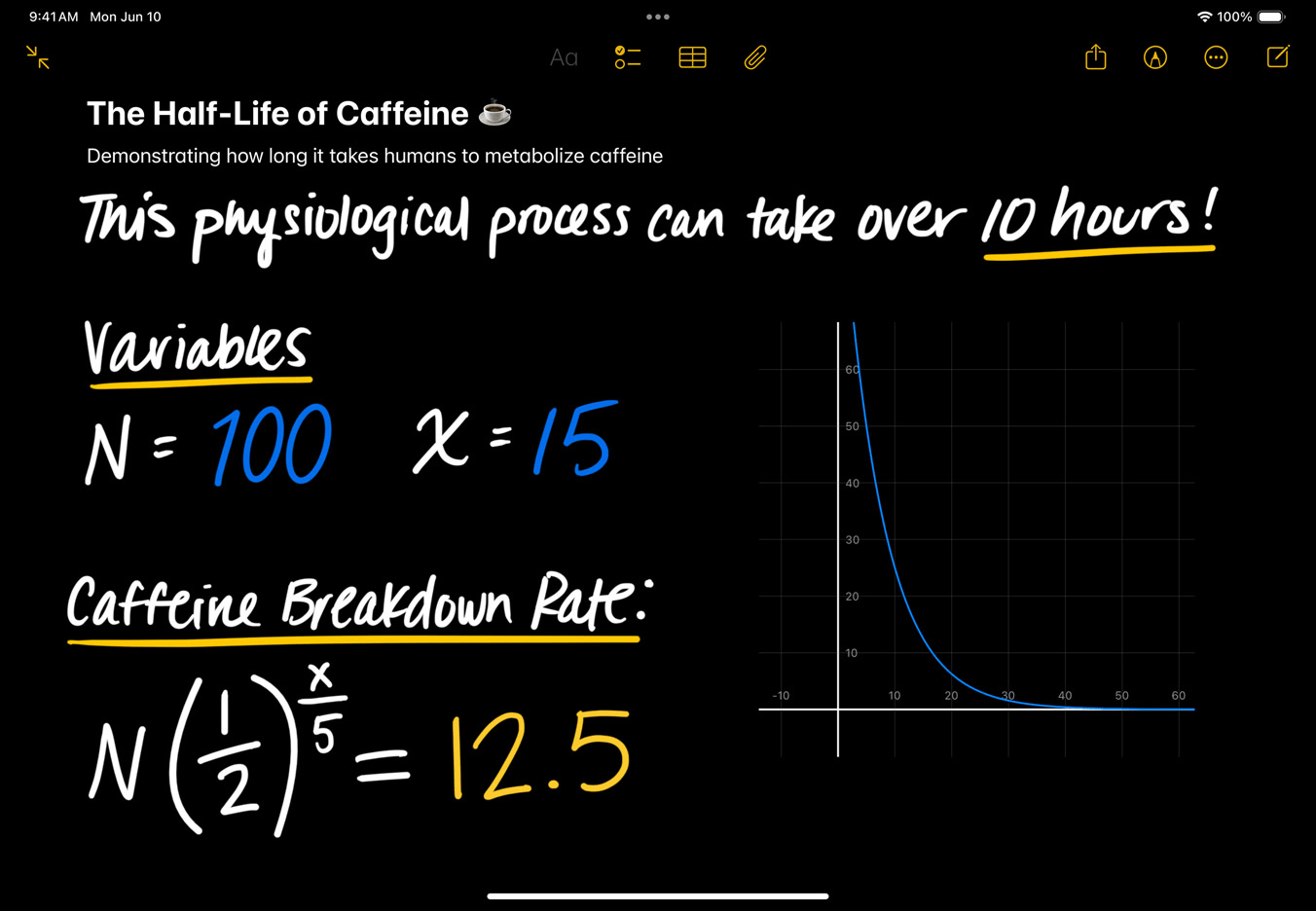
However, the real innovation lies in Apple Pencil integration. iPadOS 18 introduces a new feature called “Math Notes” that leverages the power of the Apple Pencil. Here’s how it works: you can handwrite a math problem directly on the screen, and the Calculator app will recognize your handwriting and solve the equation for you. It essentially transforms your iPad into a smart notepad, seamlessly blending handwritten input with digital calculations. This innovative feature caters to students, professionals working with complex equations, or anyone who simply prefers the tactile experience of writing over tapping buttons.
Apple iPad Calculator app
Math equations written with Apple Pencil, being solved instantly in Notes.

The arrival of the Calculator app isn’t entirely unexpected. Rumors about Apple developing a native calculator for the iPad swirled earlier this year. It follows a similar trend – in 2022, iPadOS 16 introduced a dedicated Weather app, another feature that seemed long overdue for a device designed for productivity and entertainment.

Beyond the Calculator app, iPadOS 18 brings other noteworthy improvements. “Smart Script” enhances the iPad’s handwriting recognition capabilities, making it easier to convert handwritten notes into digital text. Additionally, iPadOS 18 inherits some of the personalization features introduced with iOS 18, allowing users to further customize their iPad experience.

While some might scoff at the inclusion of a basic Calculator app, for iPad users, it signifies a shift in Apple’s approach to its tablet ecosystem. The iPad is no longer just a content consumption device; it’s a powerful tool for work, creativity, and even scientific exploration. The arrival of the Calculator app, along with features like Math Notes and Smart Script, further reinforces this notion. With iPadOS 18, the iPad is finally getting the features and functionalities that many users have been craving for years. It’s a small step, but it’s a significant one, marking a new chapter for the iPad as a truly versatile computing device.


Discover more from GadgetBond

Subscribe to get the latest posts sent to your email.

Most Popular

The $19 Apple polishing cloth supports iPhone 17, Air, Pro, and 17e

Apple MacBook Neo: big power, surprising price, one clear target — Windows

Everything Nothing announced on March 5: Headphone (a), Phone (4a), and Phone (4a) Pro

MacBook Neo and external monitors: it’s complicated

OpenAI’s GPT-5.4 is coming — and it’s sooner than you think

Also Read
A simple illustration shows a large black computer mouse cursor pointing toward a white central hub with five connected nodes on an orange background.

Claude Marketplace lets you use one AI commitment across multiple tools

Perplexity Computer promotional banner featuring a glowing glass orb with a laptop icon floating above a field of wildflowers against a gray background, with the text "perplexity computer works" in the center and a vertical list of action words — sends, creates, schedules, researches, orchestrates, remembers, deploys, connects — displayed in fading gray text on the right side.

Perplexity Computer is the AI that actually does your work

99ONE Rogue 102321

99ONE Rogue wants to kill the ugly helmet comms box forever

TACT Dial 01 tactile desk instrument

TACT Dial 01: turn it, press it, focus — that’s literally it

Close-up of a person holding the Google Pixel 10 Pro Fold in Moonstone gray with both hands, rear-facing triple camera array and Google "G" logo prominently visible, worn against a silver knit top and blue jacket with a poolside background.

Pixel Care+ makes owning a Pixel a lot less scary — here’s why

Woman with blonde curly hair sitting outside in a lush park, holding a blue Google Pixel 10 and smiling at the screen.

Pixel 10a, Pixel 10, Pixel 10 Pro: one winner for every buyer

Google Search AI Mode showing Canvas in action, with a split-screen view of a conversational AI chat on the left and an "EE Opportunity Tracker" scholarship and grant tracking dashboard on the right, displaying a total funding secured amount of $5,000, scholarship cards with deadlines, and status labels including "To Apply" and "Awarded."

Google’s Canvas AI Mode rolls out to everyone in the U.S.

Google NotebookLM app listing on the Apple App Store displayed on an iPhone screen, showing the app icon, tagline "Understand anything," a Get button with In-App Purchases noted, 1.9K ratings, age rating 4+, and a chart ranking of No. 36 in Productivity.

NotebookLM Cinematic Video Overviews are live — here’s what’s new

Company Info
  • Homepage
  • Support my work
  • Latest stories
  • Company updates
  • GDB Recommends
  • Daily newsletters
  • About us
  • Contact us
  • Write for us
  • Editorial guidelines
Legal
  • Privacy Policy
  • Cookies Policy
  • Terms & Conditions
  • DMCA
  • Disclaimer
  • Accessibility Policy
  • Security Policy
  • Do Not Sell or Share My Personal Information
Socials
Follow US

Disclosure: We love the products we feature and hope you’ll love them too. If you purchase through a link on our site, we may receive compensation at no additional cost to you. Read our ethics statement. Please note that pricing and availability are subject to change.

Copyright © 2026 GadgetBond. All Rights Reserved. Use of this site constitutes acceptance of our Terms of Use and Privacy Policy | Do Not Sell/Share My Personal Information.