



Microsoft is giving Copilot a much bigger job description. Instead of being primarily the place you go to ask an AI a question, the company is turning Copilot into a central workspace where you can chat, delegate work, build software, and eventually leave an AI agent running tasks on your behalf.
The company announced the redesigned Copilot on September 25 with three major experiences: Home, Code, and Autopilot. Microsoft says Home and Code will begin rolling out to its Frontier program in the coming weeks, while Autopilot is expanding to private preview at the end of September.
Home becomes the new starting point
Home is essentially Microsoft’s attempt to put everything Copilot can do under one roof. It brings Chat and Copilot Cowork together, giving users a single place to ask questions, create drafts, delegate larger tasks, review recent activity, and pick up unfinished work.
The bigger change is Office integration. Microsoft is bringing Word, Excel, and PowerPoint directly into Copilot, allowing users to create and edit real, editable documents, spreadsheets, and presentations without constantly jumping between applications. A user could ask Copilot to create a launch brief, build a budget model, or put together a presentation, then continue refining the actual file alongside the conversation.

Microsoft also says changes remain synchronized between Copilot and the Office apps, with collaboration supported through features such as @mentions. That means Copilot is moving beyond generating text in a chat window and becoming part of the actual document workflow.
And Microsoft is planning another Home feature called Today. It will act as a personalized command center for email, calendars, Teams conversations, meetings, and tasks, surfacing what users missed, what needs attention, and even preparing things such as draft replies and proposed schedule changes. Today is scheduled to enter private preview in October.
Code lets Copilot build the thing you just described
Then there is Code, which might be the most interesting part for people who don’t consider themselves developers.
Microsoft wants users to describe an app, dashboard, tracker, automation, or workflow in natural language and have Copilot build it. The company says Code can create everything from desktop widgets and interactive dashboards to cloud-hosted internal applications that can be shared with a team.
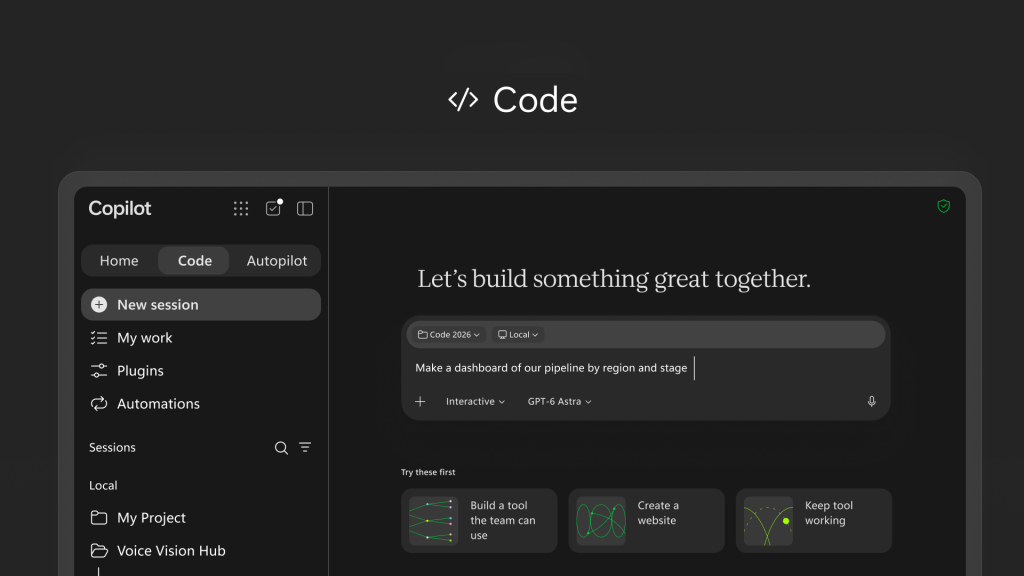
Code is powered by the same underlying technology as GitHub Copilot and runs inside a sandboxed environment. Microsoft says the resulting solutions can be hosted securely within an organization’s Microsoft 365 environment, with Microsoft’s business context and plugins available to ground what is being built.
Microsoft is also introducing Copilot Managed Runtime, which provides infrastructure for running code created by Copilot inside a company’s Microsoft 365 environment. IT teams retain governance and control while users can share applications, connect them to live data, and access them across the organization.
Code is scheduled to enter Microsoft’s Frontier program at the end of September, followed by broader availability in the coming weeks. Microsoft also says a preview will arrive later this year for Microsoft 365 Premium and Pro subscribers.
Autopilot is where Copilot gets seriously hands-off
Autopilot is Microsoft’s new name for what was previously called Scout, and the concept is pretty straightforward: give an AI agent a name, a role, and a goal, then let it keep working.
Unlike a normal chatbot that waits for your next prompt, Autopilot is designed to operate continuously. Microsoft says it can watch channels, follow up on conversations, run recurring work, and pick up projects days after the original task was started.

For example, Microsoft describes an Autopilot agent handling a supplier review from beginning to end. It could create the schedule and workback plan, prepare for meetings, manage follow-ups, and contact stakeholders for updates.
The agent runs in the cloud, so it can continue working while you’re away from your computer—or, as Microsoft puts it, while you’re sleeping.
Autopilot also gets its own identity, memory, computer, and workspace inside an organization’s tenant. It can appear in Teams, Outlook, chats, channels, and documents, where users can interact with it much like they would another colleague. Microsoft says permissions, auditing, and governance remain in place, while users define the agent’s objectives and boundaries.
That distinction is important. Microsoft isn’t presenting Autopilot as simply a smarter chat assistant. It’s positioning it as an agent that can continue carrying out work after the human has moved on to something else.
Copilot is also getting deeper business context
Behind these features is Microsoft IQ, the company’s broader intelligence layer for enterprise AI. Microsoft is expanding the context Copilot can use through Fabric IQ, Dynamics 365, Power Platform, and a new plugin registry.
Fabric IQ brings trusted organizational data into Copilot, including semantic models from Power BI. Microsoft says this allows Chat and Cowork to work with a more complete understanding of the business rather than relying only on the information explicitly included in a prompt.
The new plugin registry will also bring Microsoft, partner, and custom-built plugins into one catalog. Administrators can approve and manage them centrally, while developers and partners can publish capabilities that extend Copilot across supported experiences.
And, because apparently even AI needs a finance department watching it, Microsoft is expanding its FinOps for AI tools. Administrators will be able to manage spending policies, control which model families different groups can access, and monitor which agentic tasks are producing useful results.
Microsoft is changing how Copilot gets paid for, too
The new Copilot experience comes with a clearer split between everyday AI usage and longer-running agentic work.
Microsoft says user subscription licenses cover everyday Copilot use across Chat, Word, Excel, PowerPoint, Outlook, and Teams, including automatic model selection. More demanding capabilities such as Cowork, Code, and Autopilot, along with frontier models including Astra and Fable, will use usage-based billing.
That makes sense from Microsoft’s perspective: asking Copilot to summarize an email is one thing; having an AI agent spend hours coordinating a multi-step business process is something else entirely.
For now, though, much of this remains in Microsoft’s preview ecosystem. Home and Code are heading into Frontier, while Autopilot is moving into private preview. Microsoft says the new Copilot will continue receiving capabilities through the Frontier program.
The larger story is that Microsoft is no longer treating Copilot as a single AI feature. Home is the place to start, Code is where you build, Cowork is where you delegate complex work, and Autopilot is where you hand something over and let it keep going.
That is a considerably different Copilot from the one Microsoft launched as an AI assistant. The company is now trying to make Copilot feel less like an app you open when you need AI and more like the operating layer through which work gets done.
Discover more from GadgetBond
Subscribe to get the latest posts sent to your email.


